
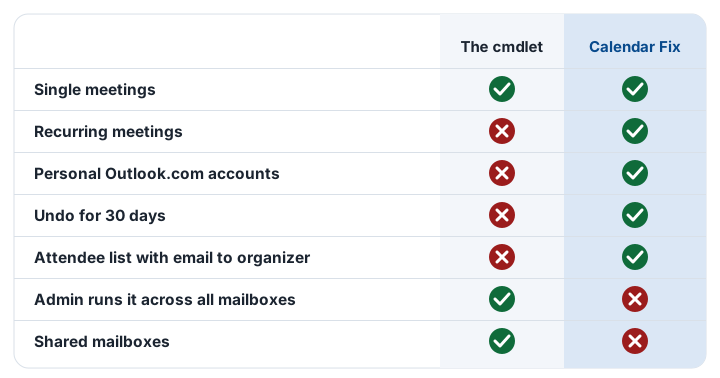
Invoke-CalendarEventMigration is Microsoft’s free Exchange Online cmdlet for moving calendar events to a new time zone. It is a good first step for Microsoft 365 admins in Canada, but it does not fix recurring meetings yet.
First 10 fixes free, then a one-time $5.99 CAD for every event in your account. Undo any time for 30 days.
How to run it
Preview first. Remove -PreviewOnly to make the change.
Invoke-CalendarEventMigration user1@contoso.com `
-FromWindowsTimeZoneId "Pacific Standard Time" `
-ToWindowsTimeZoneId "British Columbia Standard Time" `
-QueryStartDate 2026-11-01 -QueryWindowInDays 365 -PreviewOnly| Province | From | To |
|---|---|---|
| BC | Pacific Standard Time | British Columbia Standard Time |
| Alberta | Mountain Standard Time | Alberta Standard Time |
| Manitoba | Central Standard Time | Manitoba Standard Time |
A simple plan for your organization
- Run the cmdlet for single meetings across your mailboxes.
- Let people with recurring meetings use Calendar Fix.
- Approve the app once with the admin guide, and buy organization seats if you need them.
If nobody has recurring meetings, the cmdlet alone may be all you need.
Questions
Does Invoke-CalendarEventMigration fix recurring meetings?
Not in its initial release. Microsoft says you can safely rerun it when support arrives.
Does it change the mailbox time zone?
No. Use Set-MailboxRegionalConfiguration for that.