
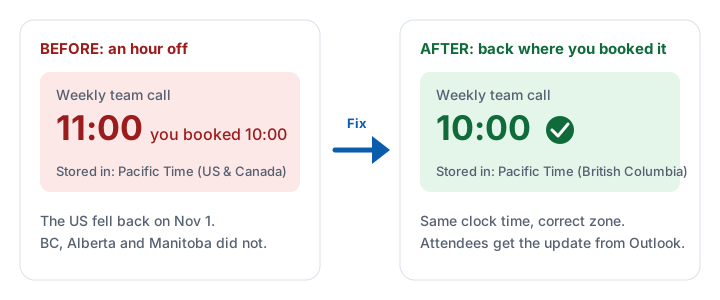
Is your Outlook calendar an hour off since November 1, 2026? In BC, Alberta and Manitoba, your clock is probably fine. Your meetings are stored in the old time zone, and they will not fix themselves.
First 10 fixes free, then a one-time $5.99 CAD for every event in your account. Undo any time for 30 days.
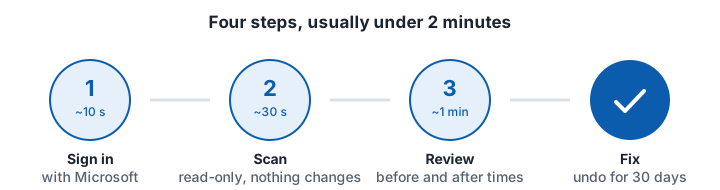
Fix them all in about two minutes
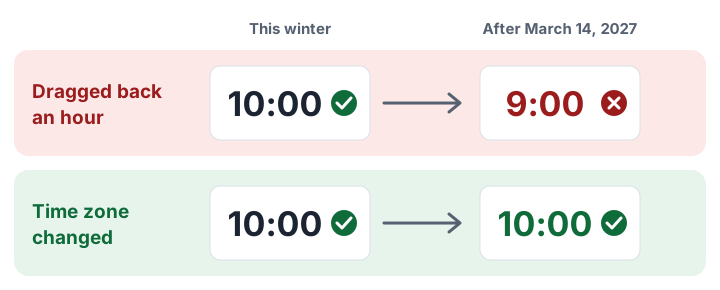
Do not drag the meeting back an hour
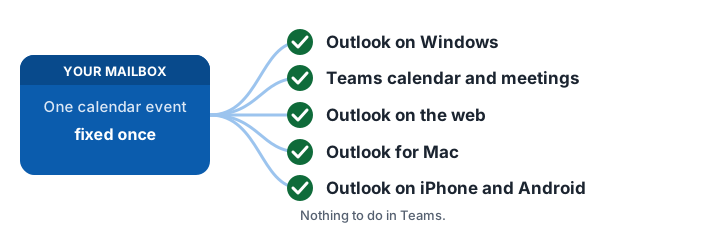
One fix covers Outlook and Teams
Prefer to do it by hand?
- Set the new time zone on your computer and in Outlook.
- Open each meeting you organized and change its time zone.
- Send the update to attendees.
- Ask organizers to fix meetings you were only invited to.
Be careful with recurring meetings: Microsoft says changing a series by hand resets any occurrence you moved or edited.
Questions
Will Outlook fix it automatically?
No. Existing meetings keep the old zone until the organizer changes them.
What about meetings with people in the US?
After the fix, a 10:00 meeting stays at 10:00 for you and lands an hour earlier for them in winter. To keep it the same for them, untick it in the preview and agree on a new time.
3 thoughts on “Outlook Calendar an Hour Off After Nov 1? How to Fix It”
Comments are closed.